
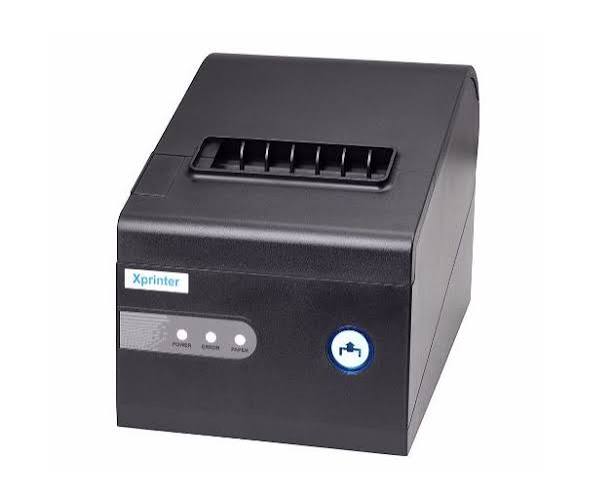
Thermal printers are widely used in retail stores, restaurants, warehouses, healthcare facilities, and logistics operations. They help businesses produce receipts, product labels, shipping information, barcode labels, and other printed records. Because printing is often part of everyday business operations, selecting suitable equipment requires more than comparing prices or choosing a model based on appearance. Businesses should consider printing requirements, technical specifications, compatibility, operating costs, and long-term support before making a purchase.
A suitable printer can help simplify routine tasks, reduce printing interruptions, and support a more organized workflow. However, the right choice depends on how frequently the device will be used and what type of material it needs to print. Before investing in an Xprinter Thermal Printer, businesses should evaluate their operational requirements and compare them with the specifications of available models to make a practical purchasing decision.
1. Identify Your Business Printing Requirements
The first step in purchasing a thermal printer is understanding exactly what the business needs to print. Different industries have different requirements, and a printer designed for one application may not be suitable for another.
For example, a small retail store may only need a receipt printer, while a warehouse may require equipment capable of producing shipping and inventory labels.
Consider the following common applications:
- Retail: Printing customer receipts, transaction summaries, and sales records.
- Restaurants: Producing kitchen orders, takeaway tickets, and customer receipts.
- Warehousing: Printing inventory labels, product identification tags, and tracking information.
- Logistics: Producing shipping labels and package identification details.
- Healthcare: Printing identification labels and administrative records where appropriate.
- Manufacturing: Creating product labels and internal tracking information.
Clearly defining the intended application helps narrow the available options and prevents businesses from purchasing equipment with unnecessary or insufficient capabilities.
2. Understand the Difference Between Direct Thermal and Thermal Transfer Printing
Thermal printing generally includes two technologies: direct thermal and thermal transfer. Understanding the difference is important because each method uses different materials and serves different purposes.
Direct Thermal Printing
Direct thermal printers use heat-sensitive paper or labels. The printhead applies heat to the material, producing text, graphics, or barcodes without requiring a separate ink ribbon.
This technology is commonly used for:
- Retail receipts.
- Restaurant order tickets.
- Short-term shipping labels.
- Queue tickets.
- Temporary product identification.
Direct thermal printing can simplify consumable management because businesses do not need ink cartridges or ribbons for this printing method.
Thermal Transfer Printing
Thermal transfer printing uses heat to transfer ink from a ribbon onto a compatible label surface. It is often selected for applications that require labels with greater resistance to handling or environmental exposure.
Before purchasing equipment, businesses should confirm which printing technology the intended model supports. They should also check whether it matches the durability requirements of their printed materials.
3. Check Printing Speed and Expected Workload
Printing speed can influence how efficiently employees complete routine tasks. In retail environments, slow receipt production may contribute to checkout delays, while warehouses may need to print large batches of labels within limited timeframes.
However, the fastest printer is not automatically the best choice. Businesses should compare rated speed with their actual workload.
Important considerations include:
- Average printing volume per day.
- Peak printing requirements.
- Typical receipt or label length.
- Frequency of continuous printing.
- Time available for routine maintenance.
A small business with occasional printing needs may not require the same performance level as a distribution center processing large numbers of shipping labels.
It is also useful to check whether the printer’s rated speed applies to the type of media and printing conditions expected in the workplace.
4. Evaluate Print Resolution and Output Quality
Print resolution determines how clearly a printer can reproduce text, graphics, and barcodes. It is particularly important when printed information contains small characters, detailed logos, or compact barcode patterns.
Businesses should consider the type of content they plan to print and select a resolution appropriate for those requirements.
For example, basic transaction receipts may not need the same level of detail as small product labels containing dense information.
When comparing models, review:
- Supported print resolution.
- Text and graphic clarity.
- Barcode printing capabilities.
- Compatibility with label dimensions.
- Performance with the intended paper or label material.
If barcode scanning is part of the workflow, test sample labels with the scanners used by employees. Clear printing is essential for dependable scanning and accurate product identification.
5. Confirm Paper and Label Compatibility
Paper compatibility is one of the most important purchasing factors. A printer may have suitable performance specifications but still be unsuitable if it cannot accommodate the materials required by the business.
For receipt printers, check:
- Supported paper width.
- Maximum roll diameter.
- Paper thickness.
- Core dimensions, where applicable.
- Supported paper type.
For label printers, also examine:
- Label width and length.
- Roll or fanfold media support.
- Label gap or black-mark detection.
- Adhesive and liner compatibility.
- Supported media thickness.
Always consult the technical documentation for the exact model. Avoid assuming that paper or labels suitable for one printer will automatically work with another.
6. Review Connectivity Options
A thermal printer must communicate with the devices and software used in the workplace. Different businesses may have different requirements depending on their POS systems, computers, networks, and operating environments.
Common connectivity options include:
USB
USB provides a direct connection between a printer and a compatible computer or POS terminal. It is commonly used for individual checkout stations.
Ethernet
Ethernet allows compatible printers to connect to a local network. This can be useful in businesses where printing devices need to communicate with network-connected systems.
Serial
Serial interfaces may be required by older POS equipment or specialized business systems.
Bluetooth and Wi-Fi
Wireless connections can provide greater placement flexibility when supported by the printer and connected devices.
Before purchasing, confirm which interfaces are available on the selected model and whether they are compatible with existing equipment.
7. Check POS Software and Operating System Compatibility
Hardware compatibility alone is not enough. A printer must also work with the software used to generate printing jobs.
For example, a retail store may use a POS application to process payments and automatically send transaction details to a receipt printer. If the printer driver or communication configuration is unsuitable, the printing process may not work correctly.
Before purchasing, verify:
- Supported operating systems.
- Availability of appropriate printer drivers.
- Compatibility with the POS application.
- Supported printing commands or languages.
- Available software development resources, if required.
- Ease of installation and configuration.
Businesses using specialized software should consult the software provider or printer supplier before making a final decision.
8. Consider Printer Size and Workplace Layout
The physical dimensions of a printer can influence how easily it fits into a business environment. Retail checkout counters, restaurant service areas, and warehouse workstations may have limited space.
A compact printer may be suitable for a small counter, while a larger label printer may require a dedicated workstation.
Evaluate the following factors:
- Available installation space.
- Printer dimensions and weight.
- Access to paper compartments.
- Cable management.
- Ventilation requirements.
- Distance from connected devices.
- Ease of replacing paper or labels.
A practical layout should allow employees to operate and maintain the printer without disrupting other workplace activities.
9. Calculate the Total Cost of Ownership
The purchase price is only one part of the overall cost of operating a thermal printer. Businesses should also consider consumables, maintenance, replacement components, and potential downtime.
A lower-priced model may appear attractive initially, but operating expenses can increase if the printer requires frequent servicing or uses expensive materials.
A complete cost evaluation should include:
- Initial equipment cost.
- Thermal paper or label expenses.
- Ribbon costs for thermal transfer models.
- Replacement printheads or rollers, where applicable.
- Maintenance and servicing expenses.
- Installation and configuration costs.
- Potential downtime and productivity losses.
Comparing these expenses over the expected service period provides a clearer picture of the printer’s overall value.
10. Examine Build Quality and Durability
The durability requirements of a printer depend on where and how it will be used. A device operating at a low-volume office desk may face different demands from one used continuously in a busy retail store or warehouse.
When evaluating construction quality, consider:
- Housing and component quality.
- Expected printing workload.
- Paper-feeding mechanism.
- Printhead design.
- Operating temperature range.
- Resistance to dust and environmental conditions, where specified.
Businesses should review the manufacturer’s technical information rather than relying only on general descriptions such as heavy-duty or commercial-grade.
It is also useful to check whether replacement parts are available for routine servicing.
11. Review Maintenance Requirements
Every thermal printer requires appropriate care to maintain consistent output. Dust, paper residue, and repeated use can affect the printhead, rollers, and paper-feeding mechanism.
Before purchasing, understand the maintenance procedures associated with the selected model.
Routine care may include:
- Cleaning the printhead using approved materials.
- Inspecting the platen roller.
- Removing loose paper fragments.
- Checking cables and connectors.
- Using compatible paper and labels.
- Keeping ventilation openings clear.
- Following recommended operating conditions.
A printer with straightforward maintenance procedures can make it easier for employees to perform routine checks without extensive technical assistance.
12. Ask About Warranty and Technical Support
Warranty coverage and after-sales support are important considerations, particularly for businesses that depend on daily printing operations.
If a printer stops working, delayed repairs may affect sales, order processing, or inventory activities. Understanding available support before purchasing can help businesses prepare for potential equipment problems.
Questions worth asking include:
- What is the warranty period?
- Which components are covered?
- Are replacement parts available?
- How can technical assistance be accessed?
- Is product documentation available?
- Are installation and configuration instructions provided?
- What is the process for handling defective equipment?
Businesses should also clarify whether warranty coverage differs by product model, region, or purchasing channel.
13. Evaluate Supplier Reliability and Product Information
Choosing a suitable supplier is an important part of the purchasing process. A reliable supplier should provide accurate product information and help buyers understand technical specifications.
Before placing an order, review:
- Product descriptions and specification sheets.
- Model availability.
- Pricing and order conditions.
- Delivery estimates.
- Warranty information.
- Technical support arrangements.
- Availability of compatible accessories and consumables.
For larger orders, businesses may request product samples or demonstrations before committing to a particular model.
Clear communication with the supplier can reduce misunderstandings about specifications, compatibility, and delivery expectations.
14. Consider Future Business Growth
A printer should meet current operational needs while leaving enough flexibility for expected business changes. A small retailer may eventually add checkout counters, while an online seller may begin processing more shipping labels as order volumes increase.
When evaluating future requirements, consider:
- Possible increases in daily printing volume.
- Additional checkout or packing stations.
- New software or POS systems.
- Expansion into new product categories.
- Changes in label or receipt formats.
- Additional connectivity requirements.
Choosing equipment based on realistic growth expectations can help businesses avoid replacing devices too soon.
15. Test the Printer Before Making a Bulk Purchase
For businesses purchasing several printers, testing a sample unit can reduce the risk of selecting unsuitable equipment.
A practical evaluation should include:
Installation: Confirm that the printer can be installed and configured with the intended operating system and software.
Connectivity: Test the required USB, network, serial, or wireless connection.
Print quality: Produce sample receipts or labels and examine their clarity and alignment.
Media handling: Check whether the printer feeds the selected paper or labels correctly.
Workload testing: Run printing jobs that reflect typical business activity.
Maintenance: Review how easily employees can replace paper and perform routine cleaning.
Testing under realistic conditions provides useful information that may not be apparent from a specification sheet alone.
16. Common Purchasing Mistakes Businesses Should Avoid
Businesses can make better decisions by recognizing common mistakes before placing an order.
- Choosing based only on price: A low purchase price does not necessarily mean lower long-term operating costs.
- Ignoring application requirements: Receipt printers and label printers may serve different purposes.
- Overlooking connectivity: A printer without the required interface may not work with existing equipment.
- Assuming universal compatibility: Paper, drivers, and software support vary between models.
- Ignoring workload limits: Equipment should match the expected printing volume.
- Skipping sample testing: Testing helps reveal media-handling and compatibility issues.
- Neglecting after-sales support: Warranty terms and replacement-part availability can affect long-term ownership.
Avoiding these mistakes makes the purchasing process more systematic and helps reduce the likelihood of operational problems.
Conclusion
Purchasing a thermal printer is an important decision for businesses that depend on receipts, labels, and other printed records. The right equipment should match the intended application, printing volume, media requirements, connectivity options, and software environment.
Before selecting an Xprinter model, businesses should carefully review its technical specifications, calculate long-term operating costs, and confirm the availability of warranty coverage and support. Testing the equipment with actual printing materials and workplace software can provide additional confidence in the final choice.
A well-matched thermal printer can support efficient daily workflows, simplify routine printing tasks, and provide a practical solution as business requirements develop.

